1
/
의
8
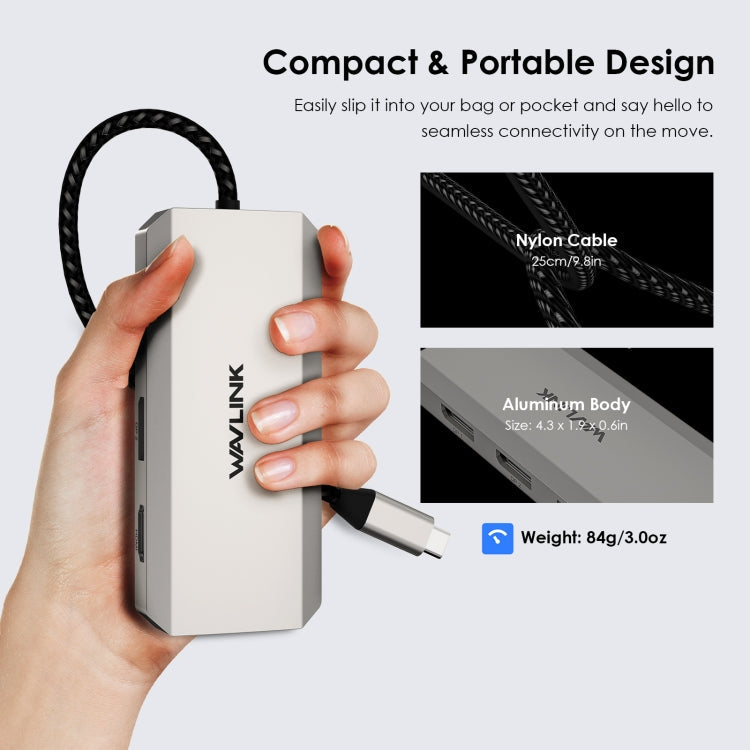
WAVLINK WL-UMD305 7 in 1 4K DP / HDMI Quard Display USB-C Hub Dock Multi-port Adapter
WAVLINK WL-UMD305 7 in 1 4K DP / HDMI Quard Display USB-C Hub Dock Multi-port Adapter
정가
£43.94 GBP
정가
할인가
£43.94 GBP
세금이 포함된 가격입니다.
배송료는 결제 시 계산됩니다.
픽업 사용 가능 여부를 로드할 수 없습니다.
1. Versatile 7-in-1 Dock: WAVLINKs powerful 7-in-1 multi-port adapter offers a range of connectivity options, including dual DP ports (4K@60Hz), one HDMI port (4K@60Hz), one VGA port (1080P@60Hz ) and three 480Mbps USB2.0-A ports. With this dock, you can easily upgrade your workstation with a single type-C port to increase your productivity. NOTE: Please make sure your laptop’s type-C port supports video output
2. Quad Display is authorized to work: Connect up to four monitors with 1080P@60Hz using 2DP, HDMI and VGA ports (under DP1.4), which is a great choice for multitasking and expanding your workspace. Imagine having multiple screens that allow you to have different applications, documents, or browser tabs open at the same time. Please note: Windows laptops support up to 4 monitors (including the host screen); macOS-based computers only support one external monitor with different content
3. Triple 4K Ultra HD Display: Supports triple 4K (3840x2160) Ultra HD display via 2DP and HDMI ports, providing visual creators and gamers with superior image quality. Whether youre editing photos, videos or working on complex designs, you can immerse yourself in realistic details and vivid colors because the 4K laptop base delivers accurate color reproduction and precise image rendering. Note: Due to graphics card limitations, some Windows laptops may only support 3 monitors (including the host screen)
4. Expanded USB connection: Equipped with 3 USB 2.0 interfaces (USB-A), which can connect a variety of peripherals such as mice, keyboards, and USB disks. Easily transfer data at speeds up to 480Mbps, ensuring fast and efficient file transfers. Increase your productivity by easily connecting and using multiple peripherals simultaneously, ideal for work and leisure
5. Plug and play: for Windows 11/10/8.1/8/7, Mac OS, Chrome OS, Linux, iPad OS, Harmony OS, Android and OTG functions. Fits your Thunderbolt 3/4 laptop or USB-C port device that supports video output
How to confirm whether the Type-C port of a laptop supports video output?
1. Please check the model number of your laptop, it should be on the back of the label;
2. Search (brand + device model + manual) in Google, for example: (asus ux435 manual);
3. Check the manual and navigate to the view and check the Type-C specs. If it says the type-c port supports display, it means it can support video output. If the specification states that the Type-C port only supports bandwidth, this means that the Type-C port may not support video output.
2. Quad Display is authorized to work: Connect up to four monitors with 1080P@60Hz using 2DP, HDMI and VGA ports (under DP1.4), which is a great choice for multitasking and expanding your workspace. Imagine having multiple screens that allow you to have different applications, documents, or browser tabs open at the same time. Please note: Windows laptops support up to 4 monitors (including the host screen); macOS-based computers only support one external monitor with different content
3. Triple 4K Ultra HD Display: Supports triple 4K (3840x2160) Ultra HD display via 2DP and HDMI ports, providing visual creators and gamers with superior image quality. Whether youre editing photos, videos or working on complex designs, you can immerse yourself in realistic details and vivid colors because the 4K laptop base delivers accurate color reproduction and precise image rendering. Note: Due to graphics card limitations, some Windows laptops may only support 3 monitors (including the host screen)
4. Expanded USB connection: Equipped with 3 USB 2.0 interfaces (USB-A), which can connect a variety of peripherals such as mice, keyboards, and USB disks. Easily transfer data at speeds up to 480Mbps, ensuring fast and efficient file transfers. Increase your productivity by easily connecting and using multiple peripherals simultaneously, ideal for work and leisure
5. Plug and play: for Windows 11/10/8.1/8/7, Mac OS, Chrome OS, Linux, iPad OS, Harmony OS, Android and OTG functions. Fits your Thunderbolt 3/4 laptop or USB-C port device that supports video output
How to confirm whether the Type-C port of a laptop supports video output?
1. Please check the model number of your laptop, it should be on the back of the label;
2. Search (brand + device model + manual) in Google, for example: (asus ux435 manual);
3. Check the manual and navigate to the view and check the Type-C specs. If it says the type-c port supports display, it means it can support video output. If the specification states that the Type-C port only supports bandwidth, this means that the Type-C port may not support video output.
Specification:
| Package Weight |
|
Share